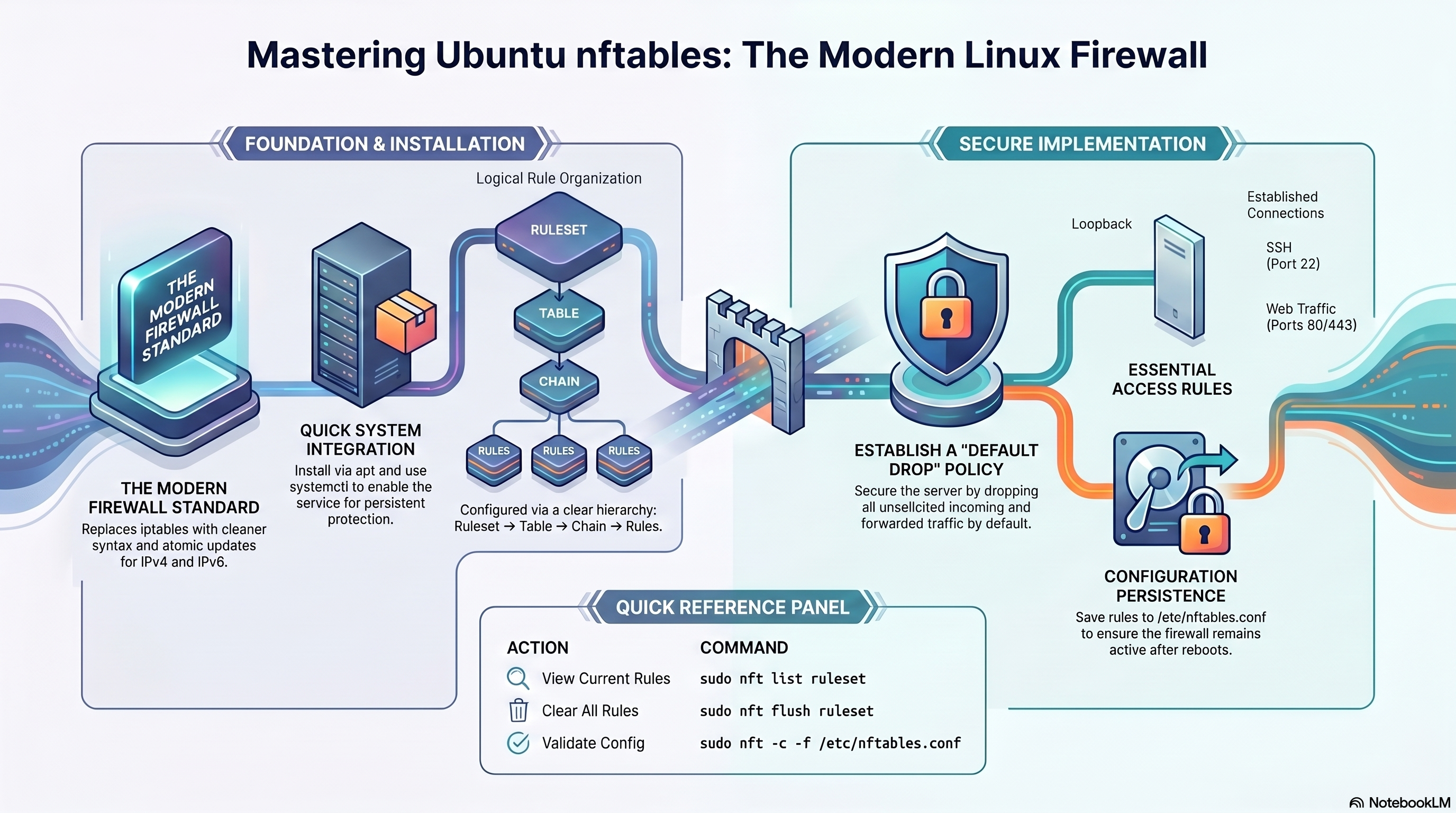
1. Concepts & Architecture
How nftables organises its firewall logic.
nftables uses a three-level hierarchy. Everything lives inside a table, which belongs to a family. Each table contains chains, and each chain holds ordered rules.
Namespace for chains. Belongs to a family: inet, ip, ip6, arp, bridge, netdev.
Either a base chain (hooks into the kernel) or a regular chain (called by a jump rule). Defines hook, priority, and default policy.
A match expression plus a verdict: accept, drop, reject, jump, goto, continue, return.
| Family | Covers | Typical Use |
|---|---|---|
| inet | IPv4 + IPv6 | General-purpose server firewall — use this by default |
| ip | IPv4 only | Legacy or single-stack IPv4 setups |
| ip6 | IPv6 only | IPv6-only or dual-stack split rules |
| arp | ARP frames | ARP filtering on LAN segments |
| bridge | Bridged frames | Container/VM bridge traffic |
| netdev | All ingress | Early packet drop at driver level (DDoS mitigation) |
2. Install & Enable
Get nftables running and persistent on Ubuntu.
sudo apt update
sudo apt install nftables

sudo systemctl enable nftables
sudo systemctl start nftables

# Verify version
nft --version
# View everything loaded
sudo nft list ruleset

# List tables only
sudo nft list tables

# List one table
sudo nft list table inet filter

# Service status
sudo systemctl status nftables
3. Secure Baseline
A production-ready starting ruleset for any Ubuntu server.
#!/usr/sbin/nft -f
flush ruleset

table inet filter {

  chain input {
    type filter hook input priority 0;
    policy drop;

    # Always allow loopback
    iif lo accept

    # Allow established / related connections
    ct state established,related accept

    # Drop invalid state packets
    ct state invalid drop

    # ICMP — allow ping and path MTU discovery
    ip protocol icmp accept
    ip6 nexthdr icmpv6 accept

    # SSH — rate-limited to 10 new connections per minute
    tcp dport 22 ct state new limit rate 10/minute accept

    # Web traffic
    tcp dport { 80, 443 } accept

    # Databases — localhost only
    ip saddr 127.0.0.1 tcp dport { 3306, 5432 } accept

    # Log and drop everything else
    log prefix "NFT DROP: " flags all drop
  }

  chain forward {
    type filter hook forward priority 0;
    policy drop;
  }

  chain output {
    type filter hook output priority 0;
    policy accept;
  }
}
Load with sudo nft -f /etc/nftables.conf. Validate first with sudo nft -c -f /etc/nftables.conf. The inet family covers IPv4 and IPv6 simultaneously.
Must be present
- Loopback iif lo accept
- ct state established,related accept
- SSH explicitly allowed before policy drop
- ICMP allowed for diagnostics
- HTTP/HTTPS if hosting web apps
- Log rule before final drop
Common mistakes
- Applying policy drop before allowing SSH
- Flushing rules without loading a replacement
- Forgetting IPv6 (use inet to handle both)
- Exposing database ports publicly
- Assuming Docker manages nftables safely by default
- Not validating config before reload
4. Rule Syntax Reference
Building blocks for writing nftables rules.
# Add table and chains
sudo nft add table inet filter
sudo nft add chain inet filter input \
  '{ type filter hook input priority 0; policy drop; }'

# Add rules
sudo nft add rule inet filter input \
  tcp dport 22 accept

# Insert rule at position 1
sudo nft insert rule inet filter input \
  position 1 iif lo accept

# Add rule before handle N
sudo nft add rule inet filter input \
  position 5 tcp dport 80 accept
# List handles (needed to delete)
sudo nft -a list ruleset

# Delete a specific rule by handle
sudo nft delete rule inet filter input handle 7

# Replace a rule by handle
sudo nft replace rule inet filter input handle 7 \
  tcp dport 22 ct state new limit rate 5/minute accept

# Flush all rules in a chain
sudo nft flush chain inet filter input

# Flush entire ruleset
sudo nft flush ruleset
| Expression | Matches | Example |
|---|---|---|
| tcp dport | TCP destination port | tcp dport 443 accept |
| udp dport | UDP destination port | udp dport 53 accept |
| ip saddr | IPv4 source address | ip saddr 192.168.1.0/24 accept |
| ip6 saddr | IPv6 source address | ip6 saddr ::1 accept |
| ct state | Connection tracking state | ct state established,related accept |
| iif / oif | Input / output interface | iif lo accept |
| limit rate | Token-bucket rate limit | limit rate 10/minute accept |
| counter | Packet/byte counter (no effect on verdict) | tcp dport 443 counter accept |
| log prefix | Log to kernel log with prefix | log prefix "DROP: " drop |
5. Sets & Verdict Maps
nftables' most powerful feature — manage groups of addresses and ports cleanly.
# Match multiple ports in one rule
tcp dport { 80, 443, 8080 } accept

# Match a CIDR block set
ip saddr { 10.0.0.0/8, 172.16.0.0/12 } drop
Use curly braces inline when you need a quick multi-value match without naming the set.
# Define a named set
sudo nft add set inet filter blocklist \
  { type ipv4_addr; flags interval; }

# Add elements
sudo nft add element inet filter blocklist \
  { 1.2.3.4, 5.6.7.0/24 }

# Reference in a rule
sudo nft add rule inet filter input \
  ip saddr @blocklist drop

# Remove one element
sudo nft delete element inet filter blocklist \
  { 1.2.3.4 }
# Route ports to different verdicts in a single rule
sudo nft add map inet filter port-actions \
  { type inet_service : verdict; }

sudo nft add element inet filter port-actions \
  { 22 : accept, 80 : accept, 443 : accept, 3306 : drop }

sudo nft add rule inet filter input \
  tcp dport vmap @port-actions
Verdict maps replace long chains of individual port rules with a single, fast kernel lookup. Ideal for servers with many services.
# Automatically track and block brute-force sources
sudo nft add set inet filter ssh-abusers \
  { type ipv4_addr; flags dynamic, timeout; timeout 1h; }

sudo nft add rule inet filter input \
  tcp dport 22 ct state new \
  add @ssh-abusers { ip saddr limit rate over 5/minute } drop
Dynamic sets with timeout automatically expire entries. This is a concise alternative to fail2ban for SSH protection.
6. NAT & Routing
Masquerade, DNAT, and IP forwarding for gateway/router setups.
# Enable IP forwarding first
sudo sysctl -w net.ipv4.ip_forward=1

# Persist across reboots
echo "net.ipv4.ip_forward = 1" \
  | sudo tee /etc/sysctl.d/99-forward.conf

# Add NAT masquerade rule
sudo nft add table ip nat
sudo nft add chain ip nat postrouting \
  '{ type nat hook postrouting priority 100; }'
sudo nft add rule ip nat postrouting \
  oifname "eth0" masquerade
# Forward external port 8080 to internal host
sudo nft add chain ip nat prerouting \
  '{ type nat hook prerouting priority -100; }'

sudo nft add rule ip nat prerouting \
  iifname "eth0" tcp dport 8080 \
  dnat to 192.168.1.10:80

# Also allow forwarded traffic in filter
sudo nft add rule inet filter forward \
  ip daddr 192.168.1.10 tcp dport 80 accept
7. Common Developer Port Matrix
Which ports to expose and how.
| Service | Port | Expose Publicly? | Recommended Rule |
|---|---|---|---|
| SSH | 22/TCP | Yes, restricted | tcp dport 22 ct state new limit rate 10/minute accept |
| Nginx HTTP | 80/TCP | Yes | tcp dport 80 accept |
| Nginx HTTPS | 443/TCP | Yes | tcp dport 443 accept |
| Node.js app | 3000/TCP | No — behind Nginx | Bind to 127.0.0.1; only 80/443 needed publicly |
| Python (Flask/FastAPI) | 5000/8000/TCP | No — behind Nginx | Keep internal; Nginx proxies 80/443 |
| MySQL | 3306/TCP | Usually no | ip saddr 127.0.0.1 tcp dport 3306 accept |
| PostgreSQL | 5432/TCP | Usually no | ip saddr 192.168.1.0/24 tcp dport 5432 accept |
| Redis | 6379/TCP | No | Localhost only; never expose publicly |
| DNS (resolver) | 53/UDP+TCP | Internal only | Allow from trusted subnet if running local DNS |
| Docker published port | Varies | Depends | Review host exposure carefully; Docker may bypass nftables |
8. Developer Guide
Practical firewall setups for Node.js, Python, Nginx, MySQL, PostgreSQL, and SSH.
# Bind Express / Fastify to localhost — never 0.0.0.0 in production
app.listen(3000, '127.0.0.1')

# Only allow Nginx ports publicly; Node port stays off the internet
tcp dport { 80, 443 } accept

# If you must expose Node directly during development (not recommended for prod):
ip saddr 192.168.1.0/24 tcp dport 3000 accept
Keep the Node.js process internal. Nginx handles TLS, rate limiting, caching, and load balancing. Only 80/443 need to be open to the world.
# Gunicorn / Uvicorn — bind locally
gunicorn app:app --bind 127.0.0.1:8000
uvicorn app:app --host 127.0.0.1 --port 8000

# nftables — only expose web ports
tcp dport { 80, 443 } accept
The same Nginx reverse-proxy pattern applies. Expose only 80/443 and keep the WSGI/ASGI port internal.
server {
    listen 80;
    server_name example.com;
    return 301 https://$host$request_uri;
}

server {
    listen 443 ssl;
    server_name example.com;

    ssl_certificate     /etc/letsencrypt/live/example.com/fullchain.pem;
    ssl_certificate_key /etc/letsencrypt/live/example.com/privkey.pem;

    location / {
        proxy_pass         http://127.0.0.1:3000;
        proxy_set_header   Host              $host;
        proxy_set_header   X-Real-IP         $remote_addr;
        proxy_set_header   X-Forwarded-For   $proxy_add_x_forwarded_for;
        proxy_set_header   X-Forwarded-Proto $scheme;
    }
}
With this setup nftables only needs to open 80 and 443. The app port is never exposed.
# MySQL — localhost only
ip saddr 127.0.0.1 tcp dport 3306 accept

# PostgreSQL — private office LAN only
ip saddr 192.168.1.0/24 tcp dport 5432 accept

# Redis — localhost only
ip saddr 127.0.0.1 tcp dport 6379 accept

# Ensure nothing else can reach DB ports
# (default drop policy in the baseline handles this)
Databases should never be reachable from untrusted networks. Use SSH tunnelling or a VPN for remote DB administration.
# Basic allow
tcp dport 22 accept

# Better: rate-limit new connections
tcp dport 22 ct state new limit rate 10/minute accept

# Best: dynamic set — auto-blocks IPs that exceed 5 attempts/min for 1 hour
add set inet filter ssh-abusers \
  { type ipv4_addr; flags dynamic, timeout; timeout 1h; }
tcp dport 22 ct state new \
  add @ssh-abusers { ip saddr limit rate over 5/minute } drop
tcp dport 22 ct state new accept
Combine with SSH key authentication, a non-standard port if appropriate, and source-IP allowlisting for the strongest SSH posture.
9. Docker & Containers
How Docker interacts with nftables and what to watch out for.
# /etc/docker/daemon.json
{
  "firewall-backend": "nftables"
}
Only set this if you are intentionally testing the nftables backend. Test thoroughly — container networking behaviour can change.
- Bind containers to 127.0.0.1 so Docker does not publish to all interfaces: -p 127.0.0.1:3000:3000
- Put Nginx in front of containers for public traffic.
- Audit every -p mapping — published ports can bypass nftables.
- Review sudo nft list ruleset after starting Docker to see any changes.
10. Logging & Monitoring
See what nftables is doing in real time.
# Add a logging rule before the final drop
sudo nft add rule inet filter input \
  log prefix "NFT DROP: " flags all drop

# Watch the log live
sudo journalctl -f | grep "NFT DROP"

# Or watch kernel log
sudo dmesg -w | grep "NFT"
# Enable trace on SSH traffic (nftrace)
sudo nft add rule inet filter input \
  tcp dport 22 meta nftrace set 1

# Watch the trace output
sudo nft monitor trace

# Remove trace rule when done (use handle from nft -a list)
sudo nft delete rule inet filter input handle N
Packet tracing shows every rule a packet passes through — the most powerful debugging tool in nftables.
# Named counter
sudo nft add counter inet filter web-hits

# Reference in a rule
sudo nft add rule inet filter input \
  tcp dport { 80, 443 } counter name web-hits accept

# Read the counter
sudo nft list counter inet filter web-hits

# Reset all counters
sudo nft reset counters
Named counters let you instrument specific traffic flows without affecting packet verdicts.
11. Security Hardening Checklist
Production requirements before going live.
- Default policy drop on input
- Allow only required ports
- Use ct state invalid drop
- Rate-limit SSH new connections
- Restrict database ports to localhost or trusted subnet
- Log and drop everything else
- Validate config before reloading: nft -c -f
- Load full ruleset atomically: nft -f /etc/nftables.conf
- Enable nftables service for persistence
- Review rules after every Docker change
- Test from both trusted and untrusted networks
- Document every exception rule
12. Quick Recipes
Copy-paste rulesets for common scenarios.
table inet filter {
  chain input {
    type filter hook input priority 0; policy drop;
    iif lo accept
    ct state established,related accept
    ct state invalid drop
    ip protocol icmp accept
    ip6 nexthdr icmpv6 accept
    tcp dport 22 ct state new limit rate 10/minute accept
    tcp dport { 80, 443 } accept
    log prefix "NFT DROP: " drop
  }
  chain forward { type filter hook forward priority 0; policy drop; }
  chain output  { type filter hook output priority 0; policy accept; }
}
table inet filter {
  chain input {
    type filter hook input priority 0; policy drop;
    iif lo accept
    ct state established,related accept
    ct state invalid drop
    # SSH from office only
    ip saddr 192.168.1.0/24 tcp dport 22 accept
    # MySQL / PostgreSQL from app subnet
    ip saddr 10.0.0.0/24 tcp dport { 3306, 5432 } accept
    log prefix "NFT DROP: " drop
  }
  chain forward { type filter hook forward priority 0; policy drop; }
  chain output  { type filter hook output priority 0; policy accept; }
}
table inet filter {
  set blocklist {
    type ipv4_addr; flags interval;
    elements = { 1.2.3.4, 5.6.7.0/24 }
  }
  chain input {
    type filter hook input priority 0; policy drop;
    ip saddr @blocklist drop
    iif lo accept
    ct state established,related accept
    tcp dport { 22, 80, 443 } accept
    log prefix "NFT DROP: " drop
  }
}
# Persist IP forwarding
echo "net.ipv4.ip_forward = 1" | sudo tee /etc/sysctl.d/99-forward.conf
sudo sysctl -p /etc/sysctl.d/99-forward.conf

# NAT table
table ip nat {
  chain postrouting {
    type nat hook postrouting priority 100;
    oifname "eth0" masquerade
  }
}

# Allow forwarded traffic in filter
table inet filter {
  chain forward {
    type filter hook forward priority 0; policy drop;
    ct state established,related accept
    iifname "eth1" oifname "eth0" accept
  }
}
13. Troubleshooting
Diagnose and fix common nftables problems.
# Dry-run: check syntax without applying
sudo nft -c -f /etc/nftables.conf

# Apply the full config atomically
sudo nft -f /etc/nftables.conf

# Restart service
sudo systemctl restart nftables
sudo systemctl status nftables
# Enable trace on a specific port
sudo nft add rule inet filter input \
  tcp dport 80 meta nftrace set 1

# Watch live trace
sudo nft monitor trace

# Check logs
sudo journalctl -f | grep "NFT"

# Review full ruleset with handles
sudo nft -a list ruleset
| Command | What it does |
|---|---|
| sudo nft list ruleset | Show all active tables, chains, and rules |
| sudo nft -a list ruleset | Same, with rule handles (needed to delete rules) |
| sudo nft -c -f /etc/nftables.conf | Validate config file without applying it |
| sudo nft flush ruleset | Remove all rules (use with caution on remote servers) |
| sudo nft monitor trace | Watch packet path through rules in real time |
| sudo nft reset counters | Zero all packet/byte counters |
| sudo journalctl -f | Tail system log including nftables log lines |